Data Quality Scanner Product Family
Data Quality Scanner for Credit Reporting Accuracy and Dispute Oversight
Data Quality Scanner (DQS) is the end-to-end accuracy solution from Bridgeforce Data Solutions for credit reporting and disputes. It helps teams identify data-quality issues, investigate their causes, and strengthen oversight and response quality.
The DQS product family includes the Furnishing Module, Disputes Module, and AI Resolution Engine. The AI Resolution Engine is currently In Pilot and provides human-controlled, AI-assisted decision support for dispute analysts.
DQS Product Family
Choose Your Data Quality Scanner Product
Compare the purpose and information used by each DQS product, then select a product to explore its capabilities and next steps.
| Compare by | Furnishing Module | Disputes Module | AI Resolution Engine In Pilot |
|---|---|---|---|
| Primary need | Monitor furnished-data quality and prioritize investigation. | Evaluate indirect credit bureau disputes and dispute-response quality. | Support analysts during dispute review, before responses are submitted. |
| Information reviewed | Supplied Metro 2® credit reporting data. | Metro 2®, ACDV and AUD information evaluated using DQS rules. | Relevant dispute history, consumer documentation, images and approved procedures. |
| Review focus | Rules, fields, discrepancy patterns and affected account populations. | Unresolved corrections, bureau transformations and response-created discrepancies. | Evidence and case context, including missing or contradictory information. |
Swipe or scroll the comparison horizontally to see all three products.
AI Research Assistant extends the Furnishing Module as an Optional Premium Add-on, currently In Pilot. Review scope depends on the supplied or available data and selected configuration.
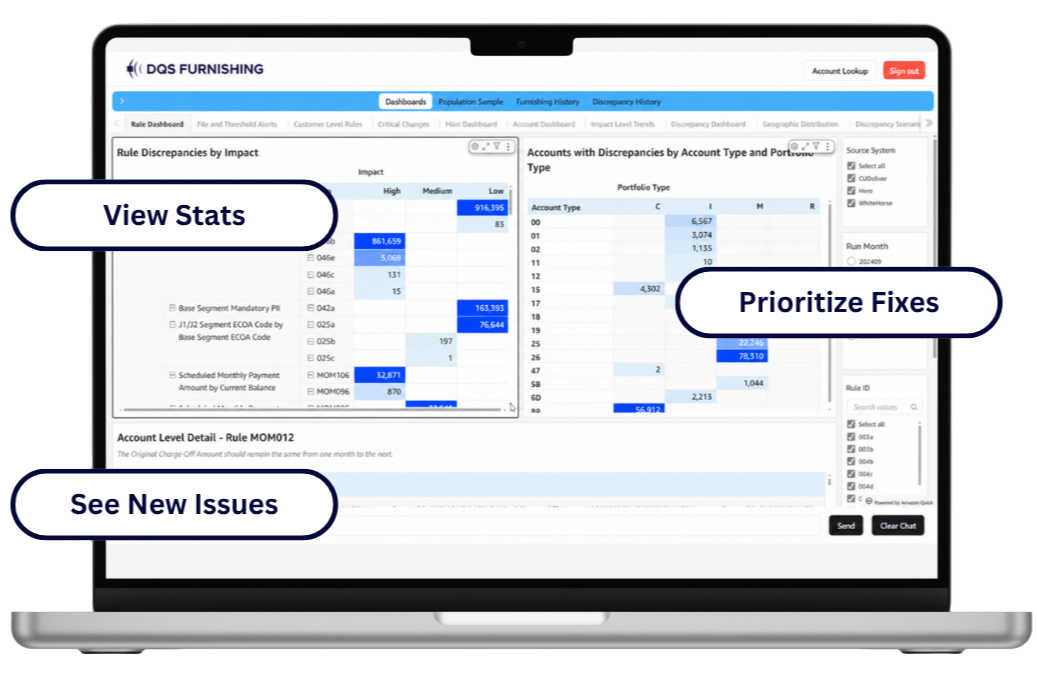
Furnishing Module
Find and prioritize credit reporting discrepancies.
The Furnishing Module evaluates 100% of supplied Metro 2® credit reporting data using 400+ risk-ranked rules and alerts.
- Identify discrepancy patterns and affected account populations.
- Prioritize rules, fields and issues for deeper investigation.
- Support validation and review of subsequent reporting.
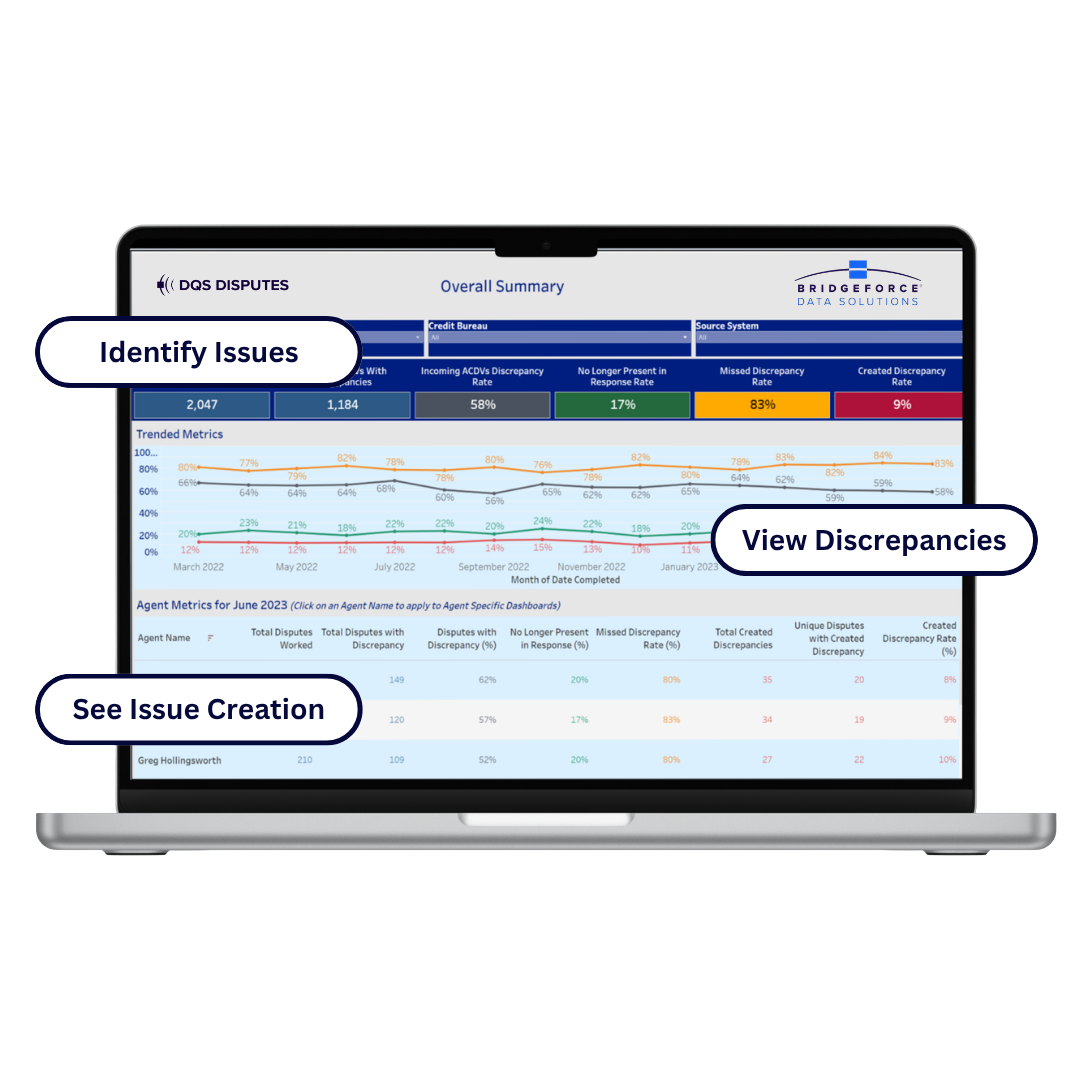
Disputes Module
Evaluate disputes and analyst-response quality.
The Disputes Module evaluates indirect credit bureau disputes and analyst responses across the full available population, using DQS rules, Metro 2®, ACDV and AUD information.
- Identify unresolved corrections and bureau transformations.
- Surface analyst-created discrepancies and recurring response-quality issues.
- Support QA, coaching, investigation and remediation decisions.
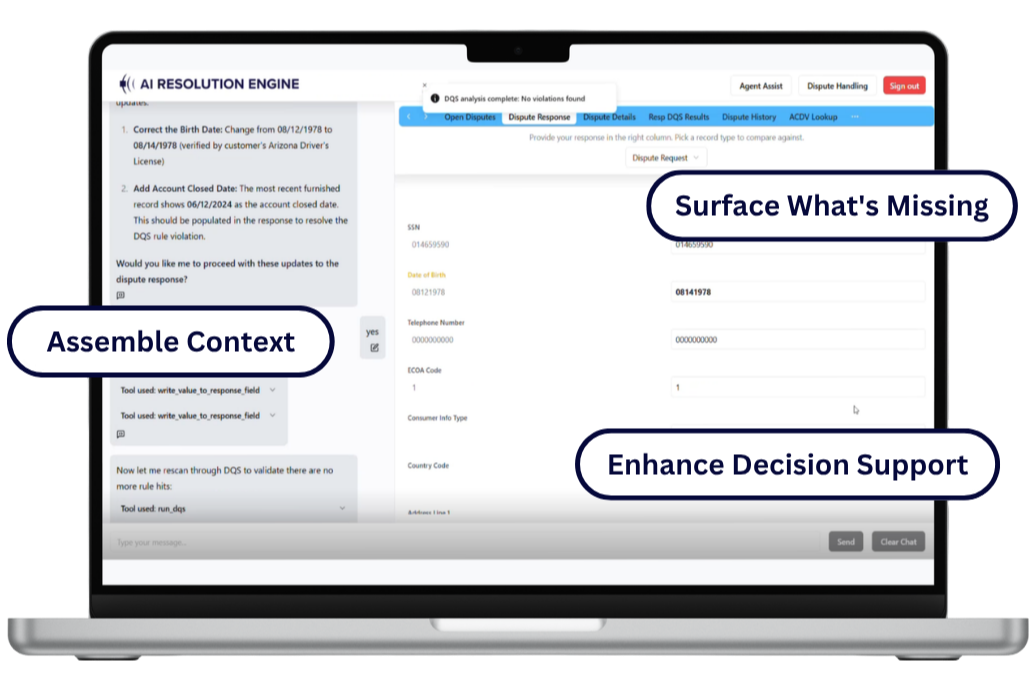
AI Resolution Engine
Support analysts before dispute responses are submitted.
The AI Resolution Engine is an analyst-facing, AI-assisted decision-support product designed to bring consumer documentation, images, dispute history and approved procedures together during dispute review.
- Assemble relevant evidence and case context.
- Apply approved process guidance and surface missing or contradictory information.
- Support review while preserving human judgment and institutional decision ownership.
The Furnishing Module and Disputes Module can be used independently or together. Discuss your product fit →
Proven DQS Foundation
Established Data Quality Scanner Performance
Monitoring coverage, risk-ranked review and reported discrepancy reductions across the Furnishing Module and Disputes Module.
Metro 2® Credit Reporting Accuracy
Furnishing Module
The Data Quality Scanner Furnishing Module monitors supplied Metro 2® data to help teams identify discrepancy patterns, prioritize affected accounts and review subsequent reporting.
- Furnishing Monitoring
- 100%
- Of furnished tradelines in the supplied data monitored for accuracy and consistency.
- Rules and Alerts
- 400+
- risk-ranked rules and alerts supporting furnishing data-quality review.
- Furnishing Discrepancies
- UP TO 90%
- Reduction in furnishing discrepancies. See the historical client result below.
Furnishing evidence and monitoring scope
What does full-population monitoring cover?
The Furnishing Module evaluates the supplied, in-scope Metro 2® reporting population rather than a selected sample. Monitoring coverage describes the data reviewed; it does not mean that every possible error is detected or that all reported data is correct.
What supports the furnishing reduction figure?
A historical Bridgeforce Data Solutions case study reports that one institution reduced total discrepancies by more than 90% in the three months following its initial DQS application. DQS supported a broader assessment and corrective work by the institution; this was a client result, not a guaranteed outcome.
Read the historical furnishing case study (PDF)
The case study describes an earlier DQS version. Its historical rule count is not the current 400+ risk-ranked rules and alerts, and its results do not establish AI-specific performance.
Dispute-Response Quality
Disputes Module
The Data Quality Scanner Disputes Module reviews disputed accounts and dispute-agent responses across the available population, supporting QA, coaching and remediation beyond manual sampling.
- Dispute Monitoring
- 100%
- Of dispute-agent responses in the available data monitored for response quality.
- Unresolved Dispute Discrepancies
- UP TO 80%
- Reported reduction in unresolved dispute discrepancies. Results vary by institution and scope.
Disputes outcomes and monitoring scope
What does dispute-response monitoring cover?
The Disputes Module uses DQS rules with available Metro 2®, ACDV and AUD information to identify unresolved corrections, analyst-created discrepancies and recurring response-quality issues. The 100% figure refers to the available, in-scope dispute-agent-response population, not every dispute or record held outside the supplied data.
How should the reduction figure be interpreted?
Up to 80% refers to the reported reduction in unresolved dispute discrepancies, not an 80% reduction in all disputes. It is not a guaranteed result or a measure of AI Resolution Engine performance. Teams review findings and determine appropriate corrective action.
Connected Credit Reporting Oversight
How DQS Connects Furnishing Accuracy to Dispute Outcomes
The Data Quality Scanner Furnishing Module and Disputes Module can be used independently or together. When paired, teams can view furnishing and dispute data together to investigate how reporting issues relate to disputes and whether responses address them. Recurring dispute findings can also guide upstream investigation, within the scope of the data supplied and available for review.
Upstream · Furnished Data
Furnishing Module
Review supplied Metro 2® credit reporting data to identify reporting patterns and affected populations. Examining relevant fields and reporting periods gives teams context for investigating concerns raised in disputes and determining whether a concern extends beyond an individual account.
Explore the Furnishing Module →Downstream · Disputes and Responses
Disputes Module
Review indirect credit bureau disputes and dispute-agent responses using DQS rules, Metro 2®, and ACDV and AUD information. Examine bureau transformations, unresolved corrections and response-created discrepancies to understand what changed between furnished data, the dispute and the response.
Explore the Disputes Module →Operational Need + Industry + Team Fit
Find Your DQS Fit
Start with the reporting or dispute problem your organization needs to address. Explore the relevant DQS configuration, then open the details that match your industry and team.
01 · Operational Need
What Are You Trying to Solve?
Compare the starting points below. Expand a scenario for investigation questions and scope, or visit the product page for full capabilities.
Improve Furnishing Accuracy
Core Module
Furnishing Module
Start with oversight of supplied Metro 2® data. Identify potential discrepancies, reporting patterns, and affected populations so your team can prioritize investigation.
Furnishing investigation details
- Which rules or fields are driving the discrepancy?
- Where are issues concentrated across the supplied population?
- What changed between reporting periods?
Use DQS findings to focus review and corrective priorities. Your team validates the issue and directs any changes through its own processes.
Investigate Furnishing Issues More Deeply
Furnishing Configuration
Furnishing Module + AI Research Assistant
When a finding needs deeper research, extend Furnishing with premium account lookup and AI-assisted exploration of available DQS results and furnishing records.
Account-level research details
- Which furnished fields changed over the account’s history?
- How can the affected population be refined for investigation?
- What patterns merit closer review?
The add-on supports field-level history and plain-English research. It does not imply access to every internal system or data source; enablement and available data scope must be confirmed.
Strengthen Dispute Oversight
Core Module
Disputes Module
Review disputed accounts and dispute-agent responses across the full available population. Identify unresolved corrections, bureau transformations, and response-quality issues beyond manual sampling alone.
Dispute-response review details
- What data issue was present when the dispute arrived?
- Did the response correct it or leave it unresolved?
- Did the response introduce a new discrepancy?
DQS rules, Metro 2®, ACDV, and AUD information support this review. Findings help teams prioritize investigation, coaching, and corrective follow-up.
Add AI-Assisted Dispute Decision Support
Separate DQS Product
AI Resolution Engine
Support analysts during dispute review by bringing together relevant history, documentation, images, and approved procedures. This is distinct from evaluating dispute-response quality through the Disputes Module.
In-process decision-support details
- What information is missing or contradictory?
- How does the available evidence relate to approved procedures?
- What needs analyst review before a response is submitted?
The AI Resolution Engine is designed to support evidence review and documented decisions. Analysts retain review authority, and the institution retains decision ownership.
02 · Organization Fit
Explore Data Quality Scanner by Industry
Explore reporting and servicing situations relevant to your organization. These are investigation contexts, not promises of automatic detection or correction.
-
Credit Unions
Member-account accuracy, lean-team oversight, and reporting changes.
Explore Credit Unions →Credit union reporting scenarios
Consider member-account populations affected by core-system changes or mergers. Furnishing and dispute findings can help teams focus investigation on reporting patterns and recurring response issues.
-
Banks
Reporting and dispute oversight across portfolios, teams, and vendors.
Explore Banks →Bank reporting scenarios
Use portfolio and response-quality findings to inform business-control reviews. For multi-team or vendor-supported operations, focus on recurring issues, risk concentrations, and priorities for management follow-up.
-
Mortgage Lenders & Servicers
Servicing transfers, subservicer oversight, and borrower reporting history.
Explore Mortgage →Mortgage reporting scenarios
Consider reporting questions around transfers, default servicing, and loss mitigation. DQS findings can inform furnishing and dispute investigation alongside the servicing records and documentation your team reviews.
-
Fintechs
Reporting controls through integrations, growth, and product changes.
Explore Fintechs →Fintech reporting scenarios
Focus on potential discrepancies associated with data mapping, integrations, or new products. Furnishing findings and dispute oversight can support reporting-control discussions with operations, risk, and partner-bank teams.
-
Auto Lenders
Loan and lease reporting across servicing events and portfolio changes.
Explore Auto Lending →Auto lending reporting scenarios
Consider payment history, extensions, deferrals, repossessions, and charge-offs when investigating reporting patterns. Use furnishing and dispute findings to prioritize accounts or populations that warrant closer review.
-
Student Lenders & Servicers
Long account histories, repayment-status changes, and servicing transfers.
Explore Student Lending →Student lending reporting scenarios
Consider reporting questions involving deferment, forbearance, and repayment transitions. Furnishing and dispute findings help focus investigation; teams validate those findings against relevant history and supporting documentation.
-
Collection Agencies & Debt Buyers
Reported debt data, account transitions, and dispute-response quality.
Explore Collections & Debt Buyers →Collections reporting scenarios
Consider ownership-chain information, transfer data, and balance/status consistency during review. DQS supports reporting and dispute oversight; these use cases concern data quality and documentation, not debt-recovery performance.
-
Explore Further
More Than One Portfolio or Industry?
Review the industry pages that match your reporting responsibilities. A shared organization can have different furnishing, servicing, and dispute-oversight needs across portfolios.
View All Industries →
03 · Team Fit
What Your Team Can Do With DQS Findings
The same finding can inform operational investigation, quality review, and management priorities. Responsibilities and corrective decisions stay with your organization.
Credit Reporting & Dispute Operations
Investigate furnished-data discrepancies, unresolved corrections, and response-created issues. Prioritize affected accounts and corrective follow-up.
Compliance, Risk, QA & Business Controls
Examine recurring findings, response quality, and issue concentrations. Use the results to inform control reviews, coaching, and remediation priorities.
Data, Servicing & Operational Oversight
Investigate reporting patterns alongside system, vendor, data-source, and servicing changes. Validate findings against relevant internal records.
Portfolio, Product & Executive Leadership
Use furnishing and dispute findings to inform portfolio-risk discussions, resource priorities, and management follow-up on recurring issues.
Start with the operational need; confirm the relevant data scope, product configuration, and team responsibilities when evaluating fit.
Business Value + Direct Answers
Stronger Accuracy, Oversight, and Operational Control
Data Quality Scanner helps teams expand review beyond limited sampling, focus investigation on higher-priority findings, improve quality-control visibility, and support better-documented action across furnishing and disputes.
Business Value
What DQS Helps Teams Improve
Five areas where DQS findings support credit reporting quality, investigation, QA, and oversight.
Find Potential Issues Earlier
Surface furnishing discrepancies, unresolved corrections, and recurring response-quality issues. The AI Resolution Engine, currently In Pilot, is designed to help analysts identify missing or contradictory evidence before responding.
Expand Oversight Beyond Sampling
Review full supplied furnishing populations and full available dispute populations instead of relying only on limited manual samples.
Focus Investigation Where It Matters
Narrow findings to higher-risk rules, accounts, fields, affected populations, and recurring patterns requiring deeper review.
Strengthen QA and Management Visibility
Give quality, risk, operations, and management teams clearer visibility into repeat issues, response quality, and corrective priorities.
Support Better-Documented Action
Support investigation, corrective prioritization, audit preparation, and review readiness with clearer evidence of what was identified.
Direct Answers
Data Quality Scanner FAQs
Direct answers about DQS, Metro 2® furnishing, credit bureau disputes, AI-assisted capabilities, and implementation.
Product Family What is Data Quality Scanner (DQS)?
Data Quality Scanner (DQS) is the end-to-end accuracy solution from Bridgeforce Data Solutions for credit reporting and disputes. The product family includes the Furnishing Module, Disputes Module, and the separate AI Resolution Engine, currently In Pilot. The AI Research Assistant is an Optional Premium Add-on for the Furnishing Module and is currently In Pilot.
Metro 2® Furnishing How does DQS monitor Metro 2® credit reporting accuracy?
The Furnishing Module monitors 100% of supplied Metro 2® credit reporting data using 400+ risk-ranked rules and alerts. It helps teams identify potential discrepancies, affected populations, reporting patterns, and areas requiring investigation or corrective prioritization. Learn more about Metro 2® credit reporting or explore the Furnishing Module.
Credit Bureau Disputes How does DQS review credit bureau disputes and response quality?
The Disputes Module evaluates disputed accounts and dispute-agent responses across the full available population. It combines DQS rules with Metro 2®, ACDV and AUD information to surface unresolved corrections, bureau transformations, agent-created discrepancies, recurring dispute patterns, and response-quality issues. Explore the Disputes Module.
Product Comparison How is the Disputes Module different from the AI Resolution Engine?
The Disputes Module provides disputed-account and response-quality oversight; the separate AI Resolution Engine, currently In Pilot, is designed to support analysts during dispute review before responses are submitted.
The Disputes Module evaluates the full available, in-scope population using DQS rules and Metro 2®, ACDV and AUD information to surface unresolved corrections, bureau transformations and response-created discrepancies. The AI Resolution Engine is designed to assemble evidence, dispute history and approved procedures to support in-process decisions. The products have different roles; AI Resolution Engine is not a feature included in the Disputes Module.
Connected Oversight How do the Furnishing and Disputes Modules work together?
The Furnishing and Disputes Modules can be used independently or together to connect upstream credit reporting conditions with downstream dispute outcomes. When paired, teams can view furnishing and dispute data together within the available data scope. The Furnishing Module identifies potential Metro 2® furnishing issues, while the Disputes Module helps teams examine whether related issues remain unresolved or appear in responses and recurring dispute patterns. The separate AI Resolution Engine, currently In Pilot, is designed to extend this foundation into in-process decision support before responses are submitted.
AI Research What is the AI Research Assistant, and is it included with Furnishing?
The AI Research Assistant is an Optional Premium Add-on for the Furnishing Module; it is not automatically included and is currently In Pilot. It extends furnishing investigation with premium account lookup and AI-assisted research, including field-level history, population refinement, discrepancy investigation, and root-cause support. Users remain responsible for validating findings, prioritizing action, and directing corrective decisions. Learn more through the Furnishing Module.
AI Resolution Does the AI Resolution Engine replace analyst decision-making?
No. The AI Resolution Engine is a separate DQS product, currently In Pilot, designed to support analyst decisions rather than transfer institutional decision ownership to AI. It is designed to help analysts assemble relevant evidence, documentation, dispute history, images, and approved process guidance before a response is submitted. Human oversight and institutional decision ownership remain central. Any phased adoption of controlled automated handling for narrowly defined dispute populations depends on the institution’s approved governance, controls, and validation; it is not an unrestricted replacement for analysts. Explore the AI Resolution Engine.
Implementation What does DQS implementation require?
DQS is a cloud-based solution designed to limit implementation burden; requirements depend on the selected products and configuration. Use the following checklist to prepare for evaluation:
- Furnishing Module: Confirm the supplied Metro 2® files, reporting history and approved delivery arrangements. Furnishing files can be delivered directly via SFTP or through authorized Equifax routing where applicable.
- Disputes Module: Confirm the available Metro 2®, ACDV, AUD, dispute-response and historical data needed for the agreed review scope. Do not assume every data source or reporting period is already available.
- AI capabilities: Confirm the selected pilot, permitted data, applicable client procedures, and required approval and enablement steps. The AI Research Assistant is an Optional Premium Add-on to Furnishing; AI Resolution Engine is a separate product. Both are currently In Pilot.
- Institutional responsibilities: Confirm information-security review, access requirements, and who will validate findings, direct corrective action and approve the intended use.
This is an evaluation checklist, not a complete technical implementation specification. Confirm the scope and timing with Bridgeforce Data Solutions; setup requirements should not be assumed identical across products.
Data Requirements What data does DQS review, and what does full-population monitoring mean?
Full-population monitoring refers to the supplied or available data within the agreed DQS scope, not every record across all of an institution’s systems. The Furnishing Module reviews supplied Metro 2® data. The Disputes Module uses DQS rules with Metro 2®, ACDV, and AUD information to evaluate disputed accounts and responses. The AI Resolution Engine is designed to assemble relevant dispute history, documentation, images, and client procedures for in-process review. Confirm each product’s available history, source coverage, and configuration during evaluation; the established monitoring percentages are not AI-specific performance claims. Full-population coverage does not mean every possible error will be detected or that all data is correct. Monitoring does not remove the need for people to validate findings and direct action.
Bureau Coverage Do we have to use Equifax to use DQS?
No. DQS is bureau-agnostic; Equifax routing is an optional path for delivering Metro 2® furnishing data. Furnishers can also send files directly via SFTP. Authorizing Equifax routing does not mean DQS analysis is limited to Equifax reporting. Review the Equifax partnership and routing options with the team when confirming data delivery.
Security Review Where can our security team review DQS documentation?
The Bridgeforce Data Solutions Trust Center provides public security information and a process for requesting additional documentation. The Trust Center information page identifies SOC 2 Type 2 and PCI DSS materials and links to the SafeBase portal. Some reports require an access request. Review the applicable scope and available documents with your information-security team; do not assume every report is publicly downloadable.
Solution Scope How does DQS support oversight beyond Metro 2® data checks?
DQS connects furnished-data review, investigation, dispute-response oversight, and AI-assisted decision support across the product family. Furnishing evaluates supplied Metro 2® data before or after furnishing using 400+ risk-ranked rules and alerts. Disputes evaluates disputed accounts, bureau transformations, unresolved corrections, and response quality. The separate AI Resolution Engine, currently In Pilot, is designed to add analyst-facing decision support before dispute responses are submitted.
Find the Right DQS Starting Point for Your Credit Reporting Priorities
Start with the credit reporting or dispute priorities your team is already managing. Bridgeforce Data Solutions can help determine where DQS may fit and what should be reviewed first.
DQS supports monitoring, prioritization, investigation, and documentation. Your organization retains responsibility for validating findings, approving responses, and directing corrective action under its own governance standards.
What We Can Review Together
- Metro 2® furnishing patterns, affected account populations, and reporting concentrations
- Repeat disputes, unresolved corrections, response-quality concerns, and documentation gaps
- Portfolio-, product-, system-, vendor-, or team-level issues requiring management attention
- Furnishing Module, Disputes Module, or AI Resolution Engine (In Pilot) fit, data requirements, and next steps
Discuss DQS Product Fit
Share your current priorities. We’ll follow up to discuss relevant DQS capabilities and next steps.
Having trouble with this form? Visit our Contact Us page.